
Learn how to open elevated command prompt on your Windows system.
Why do we need elevated command prompt?
Starting from Vista, Windows has two modes for running command prompt – Elevated and normal. Normal command prompt does not allow to run commands that require admin privileges, so elevated command prompt is required. For example, you want to add a new user account to your system, this requires admin privileges, so even if you are admin, you would not be able to add a user from a command window opened in the normal way.
Below are different methods for opening an elevated command prompt.
How to open elevated command prompt?
There are two ways to open elevated command window. These are explained below.
Click on the Start button in the taskbar. Type ‘cmd’ in the search box. In the results, you will see cmd application. Right click on it, and select the option Run as administrator.
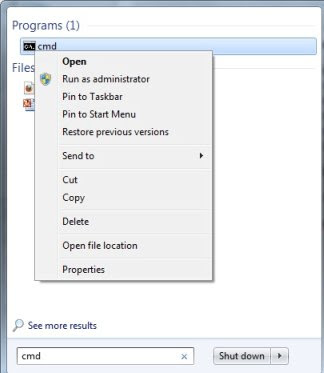
User Account Control will prompt Do you want to allow the program to make changes to your computer? Click on Yes and elevated administrator command prompt window will be opened.
The alternative way is to search for cmd in the start menu search button as mentioned above. Press Ctrl–Shift and click on the cmd application.
I can’t open the elevated command prompt because it asks for admin privileges in order to do so…the whole point of me using command prompt is because I need admin privileges in order to use an app I downloaded…Please advise
i got this command to work, running in an elevated CMD window.
net use lpt1: \\biiw725\m479 /persistent:yes
This connects a SHARED network printer with the name m479 as an lpt1 printer so I can print out of an old DOS program to the lpt1 port (which doesn’t exist)
I used to be able to run this at startup in a online .bat file, and at some point started getting the access denied message on a computer running win 7 pro for YEARS.
How do I run elevated inside of a .bat file?
I’ve also run this on a network shared printer on a win 10 pro machine but had to give user name and password as part of the command to get it to connect and print to lpt1.
this was the syntax that worked
net use lpt1: \\BIIWX200\HPM477 /user:neal “[PASSWORD REDACTED]” /persistent:yes
Couldn’t get it to run properly at startup, but no big deal to run before i used the old DOS program
Your help on running elevated in a .bat file would be greatly appreciated.
Great help, Thanks!
ok it did work but mine was already started so i had to stop it to restart it again{:/
I did entered “cmd” and as I’m typing this, I should be in it but as you can read…. It didn’t work for me either {:( and as admin too.
I am unable open elevated command prompt ,plz help me
you should check this Write powershell -Command “Start-Process cmd -Verb RunAs” and press Enter
https://stackoverflow.com/questions/19098101/how-to-open-an-elevated-cmd-using-command-line-for-windows
@Srini,
You could always go the sticky key route.
Just need to rename your cmd.exe file to sethc.exe
Go to the login screen and press shift 5 times and then you have access to an elevated command prompt without being logged in
If you forgot your password completely. An easy thing to do is look up how to create a bootable ophcrack USB. (Of course you might need to use another pc to go this route)
And how do I do this in IOT Core? :)
Tried the elevated command window. Still says System Error 5 Access Denied.
I am NOT able to reset my forgotten Administrator password using my regular user account. It keeps asking me Administrator password otherwise it says “System error 5 has occurred – Access is denied”.
I am NOT able to open “Elevated Command Prompt” because it will have a “Password” space to be enter” and I CANNOT continue after this message pop-up “Do you want to allow the program to make changes to your computer? I CANNOT Click on “Yes” since there is a “PASSWORD space” I have to enter before clicking “Yes”.
Thanks,
Danh
Hi, it seems the original microsoft account I used when setting up my new laptop late last year no longer has administrator permissions. I have been trying to find a solution and it all comes back to this:
_________________________________________________________
** User Account Control will prompt “Do you want to allow the program to make changes to your computer?” Click on Yes and elevated administrator command prompt window will be opened.
_________________________________________________________
The above instruction will not work for me because when the box opens up asking “Do you want to allow the program to make changes to your computer” there is not option for ‘yes’, only ‘no’. So all I can do is select no and I’m back to the same problem.
I can’t make changes to my antivirus or any other programs, even though my account should be an administrator account.
Any help would be greatly appreciated, thank you
It doesn’t work it still ask me for my password which is what I’m trying to change
This does not work for windows 10. Sorry. I did exactly as described and “System Error 5 Access Denied” still appears.
Why does microsoft do everything in its power to screw its customers over?
How about windows XP.
Cant find any videos or so
Elevated command prompt was introduced from Windows Vista. This did not exist in XP and previous editions.
Thank so much for this advise!!!
How to add admin Grp to User profile. I cannot open in CMD in Admin mode.
windows update stop
Got a Command line version?
Access still denied.
Administrator Command prompt is still denied access to stopping wuauserv
You need to run it as NT AUTHORITIES/SYSTEM. Google it
Hi dear ..
Is there any method that I can see all computers conected in local network ?
I writed ” net view ” but this show me little computers conected , I want to see all computers in the company ..
Please help …
I accidentally deleted my admin account and I’m trying to follow the instructions above, as well as the runas command (to which I get the error 1327: Logon failure: user account restriction. Possible reasons are blank passwords not allowed, logon hour restrictions, or a policy restriction has been enforced.)
When I try to “run as administrator,” I am not given the option to select “continue,” thus I cannot open a command prompt with elevated privileges. The window that opens looks like it has a Norton Anti-Virus shield and says “User Account Control.” It says to enter the Admin password- but there is no area to put it in, and the only available option is “cancel.”
Help?
Srini
best thing for you to do is get windows 7 disk set your bios to boot from CD run the process like you was going to do a install the disk should detect you have os installed and offer to repair it click yet then go to command prompt from there you can add a new admin user to the domain e.g net localgroup administrators sini add /
another option you can upgrade another account to admin type net user he push enter pick to see what accounts are on the PC you mite even find your old account just deactivated in cmd
so how would you create an administrative account though prompt command if your doing it though a user that isnt under administrative privileges is there any way around putting or be asked for administrators password on windows vista ofcourse
Thanks for your help. I could open elevated command prompt and apply some secure options
this process did not work for vista
This works on all Windows editions – Windows 7, 10 and Vista too.