
Control panel shows links to various configuration utilities, which are handy for administrators for computer maintenance. Run command to open control panel is ‘control’.
Open control panel from Run
You can follow the below steps to open control panel from Run window.
- Open Run window from Start menu. Alternatively, you can press the shortcut key combinations
[Windows]+[R] - Type in
controland press enter.
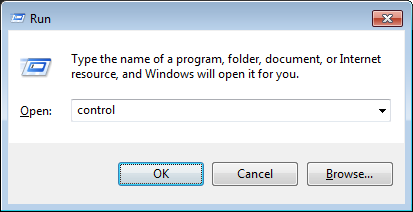
This works on all Windows editions – Windows 11 and Windows 10 and Server 2008, Server 2012 editions.
Run Control panel as administrator
We can use runas command to launch any program with a different user credentials. If you need to run control panel with administrator privileges, use the below command. We can run this either from Run window or from command prompt. In both the cases you would be prompted for administrator’s password.
runas /user:administrator control
Example:
C:runas /user:administrator control
Enter the password for administrator:
Attempting to start control as user "MYPCadministrator" ...
It opens up control panel window after printing the above message.
I need to run administration. I disabled the administrator and all the users in my windows xp professional, by mistake. now i unable to login my system.i hope kindly help me to fix this problem.
thank you so much.
not working on windows 10 pro.
i need to run app cause of deleted unnesessary files so that my computer will be running fast.
Dear admin, I disabled the administrator and all the users in my windows xp professional, by mistake. Now I unable to login I’m my system. None of the user was displayed in the screen. Kindly help me to fix this problem.
Reinstalling windows with the option of keeping all user data is the only option I can think of.
This command was over ridden by our domain group policy, which prevents users from seeing all applets. I’m a network admin. How can I get around the group policy? Thanks
I don’t think it would be possible to override the group policy. If it was restricting you to open control panel, I understand you would not be able to see those links to different tools/consoles. However as you probably know, you can open the application you need with direct run command.
I have one question. I want to run as administrator with full control of it desktop. what is command line ?
Thank for your sharing.
not working on windows 10 pro
very well, working Perfect. just want to add if you are under domain then you can write like that:
normel PC
runas /user:administrator control
Domain PC
runas /user:domainnameshahid control
how to open control panel and use it from control prompt by using dos commands please tell me
Sorry, this command doesn’t works anymore….when it asks for password of administrator; it does not types anything…..it shows:
RUNAS ERROR: Unable to run – cmd
1327: Logon failure: user account restriction. Possible reasons are blank passwords not allowed, logon hour restrictions, or a policy restriction has been enforced.
Kshitij,
Looks like there could be a policy applied by admin of the system to not allow users run this command. Also it does not show anything when you type in the password, not even ‘*’s and the cursor stays at the same position.
but what if I want to DIRECTLY open something in the Control Panel,
such as Internet Options.
Do I type
control panelinternet options
doesn’t seem to do what I want.
BACK TO THE RESEARCH LAB…
‘inetcpl.cpl’ does this.
As the admin said inetcpl.cpl will do that.
Others that could be useful are
ncpa.cpl (Network connections)
appwiz.cpl (add/remove programs)
main.cpl (Mouse Properties)
sysdm.cpl (System Properties)
mmsys.cpl (Sound Properties)
timedate.cpl (Time/date)
powercfg.cpl (Power settings)
desk.cpl (display properties / resolution)
firewall.cpl (Firewall settings)
wscui.cpl (Action center)
there are run command for them, I don’t recall network off the top of my head, but devices and printers is “control printers”
I just checked that running ‘control panel’ also opens it up the same way. Though just running ‘control’ is fast and simple to remember.
Finally! Been looking for this for a month or so.
Best reference site ever I must say.
I like this site too.