
Using Add or remove programs wizard we can install new features of the Windows(which are not installed by default) and also uninstall programs that are no longer needed. We can open this wizard from Run window by running the command appwiz.cpl
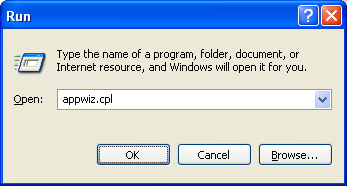
This appwiz.cpl command can be used from windows command prompt also. This command works on Windows 7 too, though the look of the windows has been changed. The wizard ‘Add or remove features’ window can be opened directly by running the command ‘optionalfeatures‘ from Run.
If you want to uninstall programs from windows command line, read the post Uninstall programs from command line.
Thank you, very much! love it
whole page are VERY usefull !!!
THANKS FOR THE info
Thanks! Saved my ass logging in remotely to do an update! :)
Just Brilliant…. SO useful!!
Very useful
I like the whole page very much because it help me a lot
Thank you
Thank Man
also
shell:addnewprogramsfolder
Good information thanks a lot