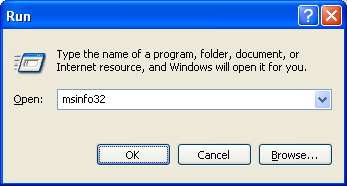
System information utility shows information of all the hardware and system software available on a computer system. This utility can be launched from Run window by executing the command msinfo32.
Listed below are the details this command shows:
OS name, version, system manufacturer, processor, BIOS, physical memory, virtual memory, page file space, CDROM, sound devices, network, ports, modem, storage, USB, system drives, signed drivers, loaded modules, services, start up programs etc.
You can also get system information from command prompt.
Adding users from command line is much easier than going through the UI. It saves…
Do you want to delete a directory from Windows command prompt(CMD)? This post explains how…
We can kill a process from GUI using Task manager. If you want to do…
Chrome is definitely the stable browser compared to other ones and it has been my…
Windows has multiple command line utilities that can help find the version of the Windows…
There are multiple ways to check whether a Windows computer is running 32-bit OS or…
View Comments
need command line information about our network system
hi there i am looking for cmd for all details of computer
Use systeminfo /s for a remote host or simply systeminfo for your local host.
need cmd for connected network and data useses as well connection and disconnection information
this command doesnt work when using windows server
it just show blank
Does this command work with windows 10 too?
Does it work with windows 7 sp 2?