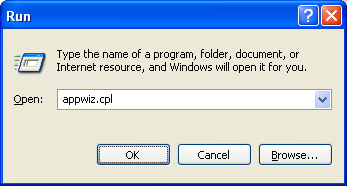
Using Add or remove programs wizard we can install new features of the Windows(which are not installed by default) and also uninstall programs that are no longer needed. We can open this wizard from Run window by running the command appwiz.cpl
This appwiz.cpl command can be used from windows command prompt also. This command works on Windows 7 too, though the look of the windows has been changed. The wizard ‘Add or remove features’ window can be opened directly by running the command ‘optionalfeatures‘ from Run.
If you want to uninstall programs from windows command line, read the post Uninstall programs from command line.
Adding users from command line is much easier than going through the UI. It saves…
Do you want to delete a directory from Windows command prompt(CMD)? This post explains how…
We can kill a process from GUI using Task manager. If you want to do…
Chrome is definitely the stable browser compared to other ones and it has been my…
Windows has multiple command line utilities that can help find the version of the Windows…
There are multiple ways to check whether a Windows computer is running 32-bit OS or…
View Comments
Thank you, very much! love it
whole page are VERY usefull !!!
THANKS FOR THE info
Thanks! Saved my ass logging in remotely to do an update! :)
Just Brilliant.... SO useful!!
Very useful
I like the whole page very much because it help me a lot
Thank you
Thank Man
also
shell:addnewprogramsfolder
Good information thanks a lot
This works. All the web pages that suggest using "wmic" are worng and/or obsolete. "wmic" couldn't find "Visual Studio 2022 Professional" or "Enterprise" on my corp laptop.