
We can launch System Properties window by right clicking on My computer icon in the start menu and then selecting Properties. This System Properties window can also be opened directly from Run window by executing the command sysdm.cpl
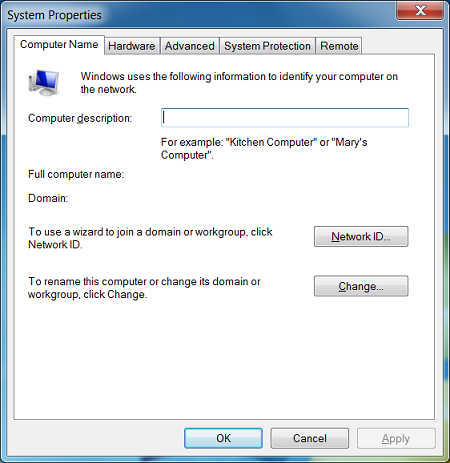
System properties has the settings categorized into 5 tabs, and each of the tabs has a dedicated command to open directly. For example, if you execute the command SystemPropertiesRemote from Run, it will open remote tab in System properties window.
These commands are listed below.
Run command for opening Computername tab in system properties is : SystemPropertiesComputerName
Run command for opening Advanced tab: SystemPropertiesAdvanced
Run command for opening Hardware tab : SystemPropertiesHardware
Run command fr opening Performance tab: SystemPropertiesPerformance
I can,t get windows update to work. So i am giving up. THank you.
Thank you for the great info. Now… I used “SystemPropertiesComputerName” and that worked. What is the command to open the “Computer Name/Domain Changes” window. I still have to click on the “Change” button to get to the window. How do you get there directly. I hope there is a command for that.
Thank you,
Tom
That’s what you use the “SystemPropertiesAdvanced” command for. It will open directly to that window.
hai sir this is prakash
..
i need a small help ..
..
all my system hardware components information to im see ..
which command is used sir..
press win+r …> and type msinfo32 and hit enter then you will get all information about your system
Prakash,
Kay say ho Bhaji –
1)
For Windows 7, Right-Click on [Computer] (on the desktop) and select [Properties].
From the new window that pops up, In the left column under ‘Control Panel Home’
click on [Device Manager].
2)
For all recent Windows versions, press [Windows Key + R] to open ‘RUN’ and type (without quotes) ‘devmgmt.msc’
I hope this helps you.
u can also use msconfig to seee the system properties .@prakash
Is there a way to use the command prompt to open User Profiles Settings from the Advanced tab?
Winkey + Pause/Break
My 2 cents: if you want to run the .cpl from a .bat or .cmd file such that it pops up, you need to shell out the command window. So for example if I have a .cmd file that I want to 2x-click and have the System Properties window appear with the System Protection tab selected, my .cmd file would be:
cmd.exe /k “sysdm.cpl,4”
The /k switch says to shell out the command to a new .cmd shell. This I found was how to get the window to actually appear.