
In Windows 7/Vista a user can open his/her application data folder by running the command ‘appdata’ from Run window.
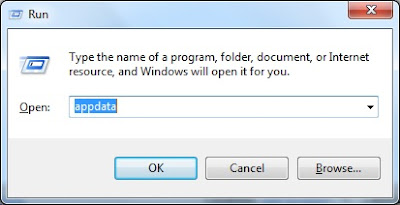
This command opens up the container folder where the local appdata folder and roaming appdata folder are stored. To open local appdata folder you need to run %localappdata% from Run window. To open roaming appdata folder we can use %appdata% command.
In Windows XP, you need to run the command %appdata% in run window to open appdata folder. There are no separate folders for local and romaing data in XP.
This doesn't work (XP Home) – it should be:
%appdata%
Thanks for the comment. The post is updated with the right commands for XP and Windows 7.
uhm so this wasnt helpful because i cant open the tab that allows me to type appdata
I can’t open a folder in my iPad
This post is for Windows OS, not for ipad/mac.
in win 10 you can copy command %appdata% in any open folder Address Bar, and make folder navigation a lot quicker
ok well idk even how to get to %appdata% or where ever im supposed to be looking thats why i came here to me this gives no information what so ever
windows key + r to open runbox